
Find Ford OEM Parts Using Your VIN
Enter your 17-character VIN to identify your Ford and start browsing genuine OEM parts for your vehicle.
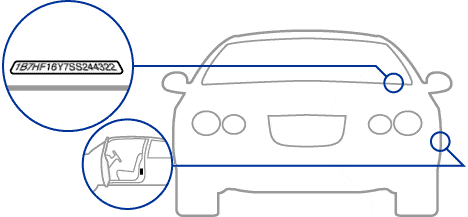
Need to locate your Ford VIN?
Check common places such as the driver's-side dashboard near the windshield and the driver's door jamb. The number may also appear on your registration or insurance documents. Your owner's manual can confirm where to look on your vehicle.
Find OEM Parts With Your VIN
Two vehicles with the same badge and model year can still leave a shopper looking at more than one service part. Using the VIN on Mac Haik Ford Parts helps narrow the catalog to vehicle information that is more specific than make, model, and year alone. That makes VIN-based catalog search especially useful for shoppers comparing genuine OEM maintenance parts, mechanical components, body pieces, electrical items, or accessories. The VIN is a strong starting point, but the final choice should still be checked against the current part description, application notes, position, equipment, and any additional details the catalog requests.
Why the VIN Is Useful for OEM Parts Shopping
A modern VIN normally contains 17 characters made up of letters and numbers. It identifies a vehicle more precisely than a broad year-and-model description, which matters when a manufacturer offers several configurations or changes components during a model run.
Ford-family parts may differ by engine, transmission, drivetrain, cab or body style, wheelbase, axle, towing equipment, and production information. That can affect F-150 and Super Duty driveline parts, Transit components, brakes, cooling systems, mirrors, lighting, and electrical parts. A VIN can help the catalog narrow the vehicle, but it does not mean every component becomes a single automatic match. Some listings still require an engine detail, a production note, a left-or-right position, dimensions, an equipment code, or inspection of the existing assembly.
How to Start a VIN-Based Parts Search
Mac Haik Ford Parts uses a combined part-number/keyword/VIN search and asks shoppers to include a VIN for the most accurate fitment when ordering or making an inquiry. Use the workflow below without entering a made-up VIN or assuming that a search result is final simply because the vehicle was recognized.
- Locate the full VIN. Check the driver-side dashboard, driver-side door jamb or certification label, registration, or insurance records.
- Enter the VIN where supported. Type every character carefully and compare any returned vehicle details with the actual vehicle.
- Browse the relevant system. Open the maintenance, mechanical, electrical, body, interior, exterior, or accessory area that matches the repair.
- Open the candidate listing. Read its fitment, production, position, equipment, and related-parts notes. Use diagrams where offered.
- Confirm before checkout. If choices remain, compare the VIN, service number, old-part information, and any extra vehicle details requested.
You can also use the Ford model catalog, parts categories, Mac Haik Ford Parts contact page to move from broad vehicle identification into the section most relevant to your repair. These links are useful when you already know the system or model but still want the VIN available for a final cross-check.
What a VIN Helps Identify
Generic VIN decoding and a manufacturer-linked parts catalog are not the same thing. A VIN contains standardized identifying information, but a generic decoder should not be assumed to reveal every trim detail, production date, transmission, option, or installed component.
A parts catalog can use the VIN as a key to vehicle records available to that catalog. Where supported, that connection may help narrow the application beyond what you could infer from the visible VIN characters alone. The amount of detail varies by manufacturer, vehicle age, catalog, and component. For that reason, a VIN-based result is best treated as a vehicle-specific filter that works together with the current OEM catalog rather than as an independent compatibility guarantee.
Parts Details Worth Checking Closely
For Ford-family vehicles, confirm engine, transmission, drivetrain, cab or body style, wheelbase, axle, and towing equipment when the catalog requests them. Brake, cooling, suspension, and driveline parts may split by package or production detail. Mirrors, lamps, modules, and harnesses can be equipment-sensitive, and modified vehicles should be matched to the components actually installed.
Using a Number From the Old Part
Not every number on a component is an orderable service number. Casting, engineering, supplier, serial, and date codes may also appear. If a visible number does not return a catalog result, use it as supporting evidence with the VIN, description, photos, and surrounding assembly.
A newer service number may supersede an older one, but check application notes, related hardware, and installation requirements. Do not assume every superseding number includes the same pieces or applies without additional conditions.
If the Catalog Still Shows Multiple Choices
If the catalog still lists two or more possible parts, stop comparing only photos or prices. Use a short verification checklist:
- Confirm the VIN was entered correctly and that the returned vehicle details match.
- Compare the current OEM service part number and any older number you already have.
- Check engine or powertrain, transmission, drivetrain, body style, axle, and production notes.
- Confirm front or rear, left or right, dimensions, color or finish, connector count, and equipment notes.
- Review diagrams for seals, clips, fasteners, brackets, gaskets, or other pieces sold separately.
- Account for modifications or replacement assemblies that may no longer match the original configuration.
If those checks do not resolve the choice, use the Mac Haik Ford Parts contact page and provide the VIN, candidate part numbers, and a clear description of the component. Include photos or measurements when they help explain the difference.
Frequently Asked Questions About VIN Parts Search
Can I find Ford, Lincoln, and Mercury parts by VIN?
Yes. Where VIN search is supported, it can identify the vehicle more precisely and narrow relevant OEM parts. Still review the part listing and application notes because some components require additional configuration details.
Where can I find the VIN on my vehicle?
Common locations include the driver-side dashboard near the windshield and the driver-side door jamb or certification label. It also appears on registration, insurance records, and the title. Check every character before submitting it.
Why does the catalog still show more than one part after I enter the VIN?
Some service parts are still separated by production change, equipment, dimensions, position, color, supplier, or other application notes. The catalog may need one more detail before one current service number can be selected.
Can I search using the number printed on my old part?
You can search it, but the marking may be a service number, casting number, engineering number, supplier number, or serial reference. If it does not match the catalog, compare it with the VIN, description, photos, and current listing.
What if my vehicle has been modified?
Use the VIN to identify the original vehicle, then verify what is actually installed. Engine swaps, suspension changes, aftermarket lighting, replacement bumpers, wheel conversions, or other modifications can change the current assembly.
Use the VIN, Then Confirm the Application
Start your search on Mac Haik Ford Parts with the VIN or the most detailed vehicle information the catalog supports, then compare the candidate OEM part listing with the vehicle and the repair you are performing. If a fitment detail is still unclear, confirm the applicable catalog notes or contact the parts team before placing the order.
"